For Windows 10 & 11
Download. Unzip. Open.
Stop right-clicking “Extract All” forever. ZipFlip watches your downloads, unpacks every ZIP the moment it finishes and gathers your photos, videos and music, while your originals stay safe.
Free for 10 ZIPs a week · Unlimited US$5.99 once · No subscription
Google Drive support — coming soon
Go on, feed it a ZIP.
A live, in-browser simulation of ZipFlip. Nothing is downloaded, uploaded or opened on your computer.
 ZipFlip
 - Your next download starts here.
Demo complete!
The real ZipFlip does all of this by itself, every time a download finishes, free for up to 10 ZIPs a week, or with no limit for US$5.99 once.
Your Downloads folder, before and after.
Drag the handle. Same downloads, two very different afternoons.
- 📦 vacation.zip
- 📦 vacation (1).zip
- 📁 vacation
- 📁 vacation (2)
- 📦 wedding_FINAL.zip
- 🖼 IMG_0412.jpg
- 📦 podcast-ep12.zip
- 📁 New folder (3)
- ❓ which one did I open?
- 📦 photos-export-2.zip
- 📁 photos-export-2 (1)
- 🎵 ep12.mp3
- 📁 vacation · 4 files
- 🖼 Photos · 🎬 Videos · 📄 itinerary.pdf
- 📁 wedding · 4 files
- 🖼 Photos · 🎵 Audio · 📄 playlist.txt
- 📁 photos-export · 212 photos
- 🎵 ep12.mp3 · ready
- ✓ Originals kept · nothing overwritten
How much clicking would you skip?
Your folders, your way.
Pick how every ZIP gets organized. Watch the same archive rearrange itself.
Change it any time in Settings. It applies to ZIPs processed from then on, so existing folders are never shuffled behind your back.
Set it up once. Forget it forever.
Install ZipFlip
It watches your Downloads folder straight away. There are no browser settings to change.
Download like normal
ZipFlip waits until each download is completely finished, so half-downloaded files are never touched.
Just open your stuff
New ZIPs are unpacked into one tidy ZipFlip folder, ready to double-click. The ZIPs already in Downloads are left alone.
Fun on the outside. Paranoid on the inside.
Tap a card to see what happens behind the scenes.
Coming soon
Google Drive, too.
Connect your own Google account and ZipFlip works with your Drive as well as your Downloads folder.
- Download from Drive. Pick files in Google’s own file picker. ZIPs and media land in ZipFlip and unpack automatically, just like browser downloads.
- Upload to Drive. Send finished photos, videos and files to a “ZipFlip uploads” folder, or any Drive folder you choose.
- Only what you pick. ZipFlip can see only the files you choose and the files it uploads for you, never the rest of your Drive. Disconnect any time.
The real thing.
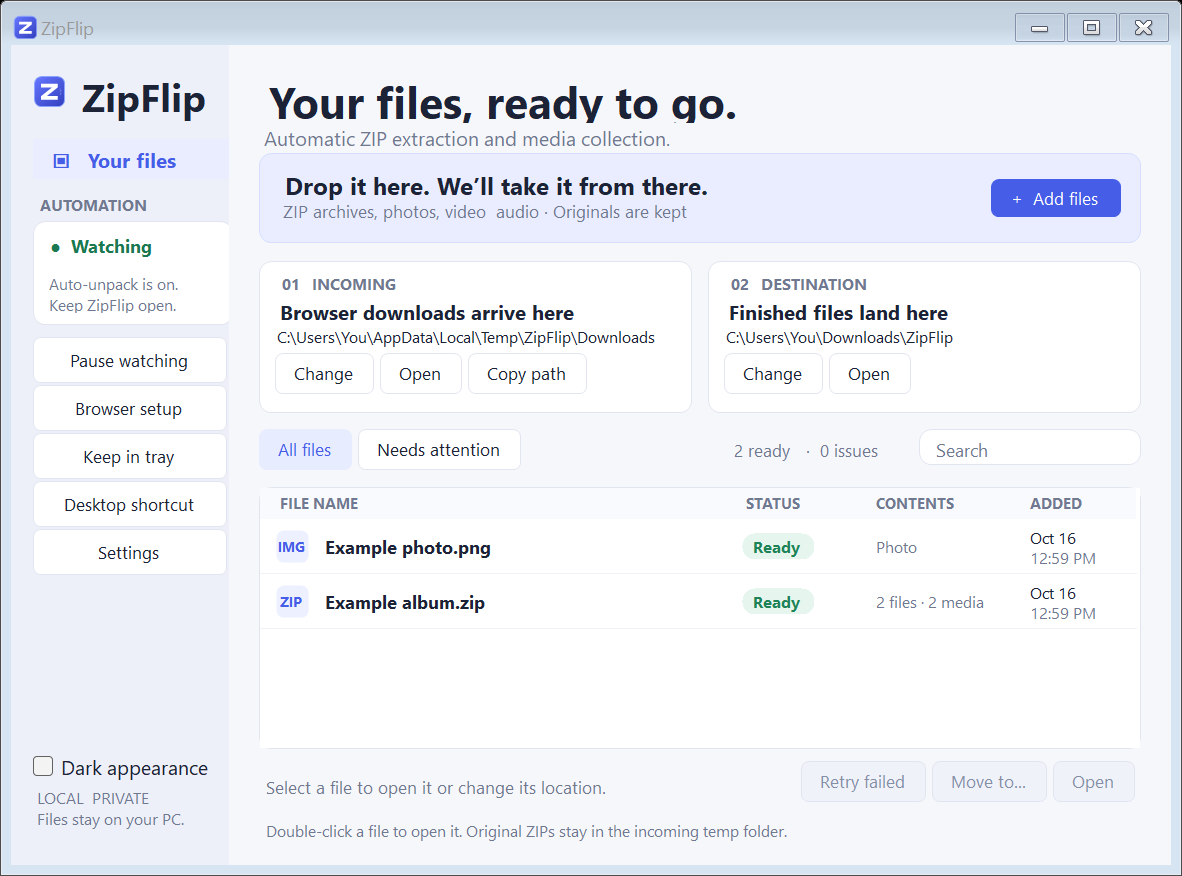
Light and dark appearance · Search · “Needs attention” with Retry · Move finished batches · Runs quietly in the system tray
What people say
Free to start. One small price for unlimited.
- Unlimited automatic ZIP extraction
- Three folder layouts
- Photos, videos and music dropped on ZipFlip
- Use it on up to 3 of your PCs
- Sign in with Google, so there's no license key to lose
- Works offline, with no tracking
- Google Drive downloads & uploads (coming soon)
- Email support from the developer
Or start with ZipFlip Free: up to 10 ZIPs in any 7 days, from your Downloads folder or dropped on ZipFlip. Sign in with Google; no card needed. Upgrade inside the app whenever you like.
Windows 10 version 2004 or later, or Windows 11.
- 🆓 Free plan: 10 ZIPs a week
- 🚫 No tracking
- 📴 Works offline
- 👋 Made by an independent developer
Questions
What do I need?
A PC running Windows 10 version 2004 or later, or Windows 11. ZipFlip uses the .NET Framework 4.8 that is built into these versions of Windows.
Is ZipFlip free?
Yes, for up to 10 ZIPs in any 7 days: each ZIP frees up again a week after it was unzipped. Sign in with Google to use it; no card is needed. ZIPs over the limit wait in your Downloads folder and unzip by themselves when there's room. ZipFlip Unlimited (US$5.99, once) removes the limit and adds Google Drive, Dropbox, and photos, videos and music dropped on ZipFlip. It works the same in the Microsoft Store version.
Why do I sign in with Google?
Your Google account is your license: it's how ZipFlip knows you've bought it, on up to 3 of your PCs, with no license key to keep safe. Signing in only shares your name, email address and Google account ID with ZipFlip's license server. It doesn't give ZipFlip access to your Google Drive, Gmail or files. The Microsoft Store version uses your Microsoft account instead.
Which version should I buy: direct or Microsoft Store?
They do the same thing. The Microsoft Store version installs and updates through the Store. The direct version is a download you install yourself.
Windows showed a warning when I opened the download. Is that normal?
Windows SmartScreen can warn about new apps it hasn't seen many times before. Only run ZipFlip downloaded from this site or the Microsoft Store. If you're unsure, email support before running it.
Does ZipFlip upload my files?
Local extraction and media processing stay on your PC. Optional Google Drive transfers are in development and will require you to connect your own account and start each transfer. See the privacy policy.
Does ZipFlip work with Google Drive?
Google Drive support is coming in a future update: download files you pick in Google Drive straight into ZipFlip, and upload finished files back to your Drive. ZipFlip will only be able to see the files you choose.
Can it open password-protected or split ZIPs?
Not yet. Those ZIPs are listed under "Needs attention" and the original is kept untouched.
Is the demo above the real app?
It's an in-browser simulation that follows how ZipFlip behaves. Nothing is downloaded or extracted on your computer.
I need help or a refund.
Email dsh456d@gmail.com with your order email and we'll help.